
By Edy Werder, a tech blogger with 20 years of experience in IT infrastructure
Short answer: backup software for your VMs, LXC containers, and physical hosts. After the first full backup, it only sends what changed. Every data chunk is stored once, compressed, and optionally encrypted. The backup client also runs on any Debian-based Linux system.
If you run Proxmox VE in a homelab or a small office, PBS is the backup tool built for it. Without a backup server, one dead disk means rebuilding every VM by hand.
I run Proxmox Backup Server in my homelab on a $150 fanless mini-PC. It backs up 21 VMs and 2 containers every day to my Synology NAS over NFS. That is one of the things I like about PBS: the backup target is flexible. A local disk, a NAS share, a remote PBS, or, since version 4.2, even S3 object storage. If a disk in my Proxmox host dies, I replace it and restore my VMs from PBS. No rebuilding from scratch.
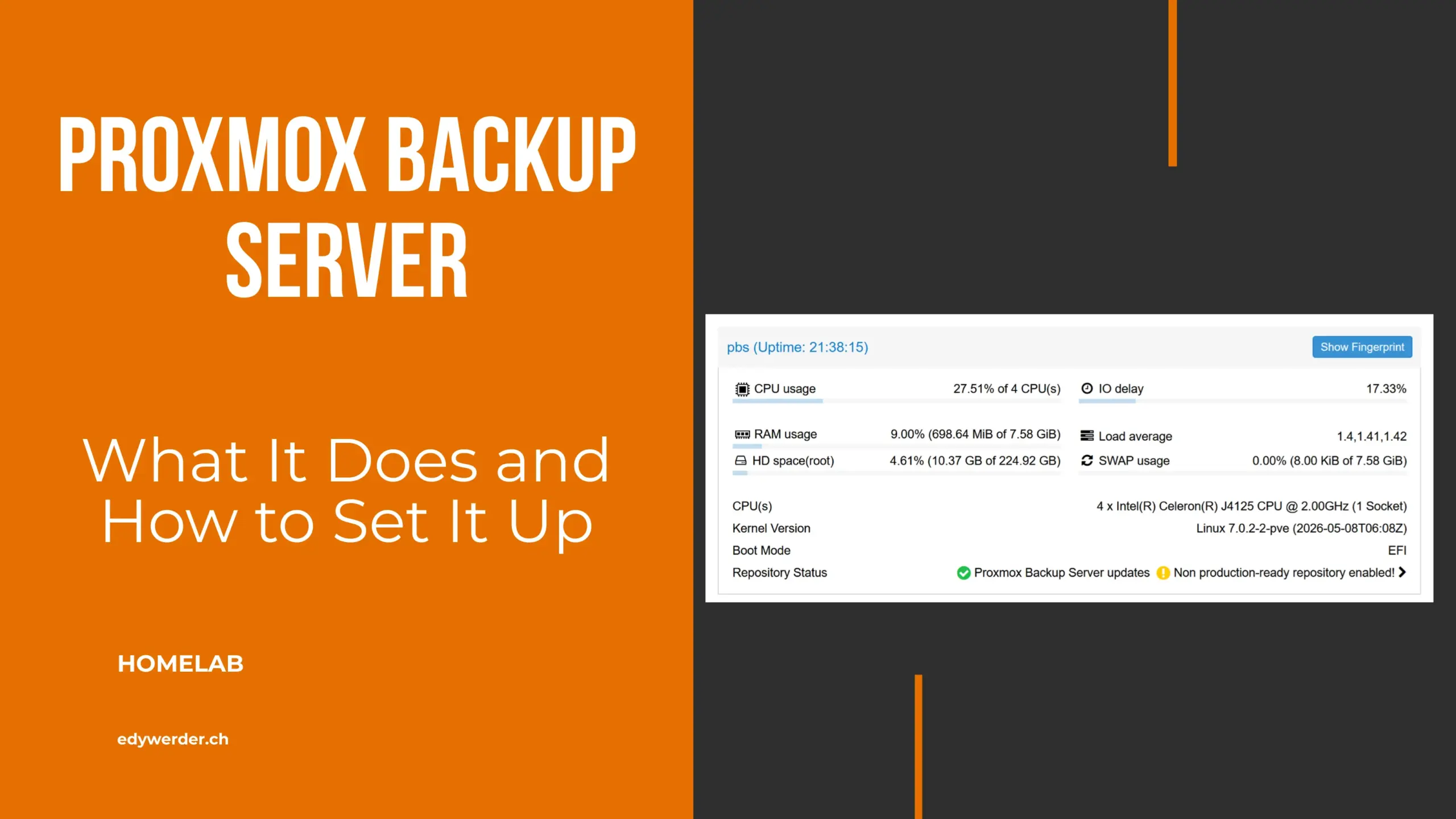
Yes. I have never paid for my Proxmox Backup Server. It is open source under the GNU AGPLv3. You download the ISO, install it, and it runs. There is no license key and no feature locked behind a payment.
I run my PBS without a subscription, on the free no-subscription repository. It’s the same software from the same ISO. Updates land there earlier and get less testing than in the Enterprise Repository. For my homelab, that trade-off is fine. The current version is PBS 4.2, released April 2026 on Debian 13 “Trixie” with ZFS 2.4.
I don’t miss paid support either. When I get stuck, I ask on r/Proxmox or the official Proxmox forum. Most of my questions get an answer within hours. When my verify jobs took 8.5 hours, r/Proxmox pointed me to the HDDs in my Synology as the bottleneck. That tip saved me days of troubleshooting.
Proxmox VE includes vzdump out of the box. You can back up your VMs and containers to an NFS share, a CIFS mount, or local storage without installing anything extra. It works, but every backup is a full copy. Five VMs backed up daily eat through backup storage fast. A simple file dump also has no way to verify data integrity.
Proxmox Backup Server uses a different method. The first backup is a full backup. Subsequent backups send only changed chunks using QEMU dirty bitmaps. Daily incremental backups take 5 to 10 minutes. PBS checks SHA-256 checksums on every run, so corrupted backup data gets caught immediately.
Proxmox Backup Server (PBS) splits backup data into chunks. VM disks use fixed 4 MiB chunks. Containers and host backups use variable-length chunks. Each chunk gets a SHA-256 hash, and the server stores every unique chunk only once. For incremental backups of running VMs, a dirty bitmap tracks which blocks changed. Only those new chunks travel over the network.
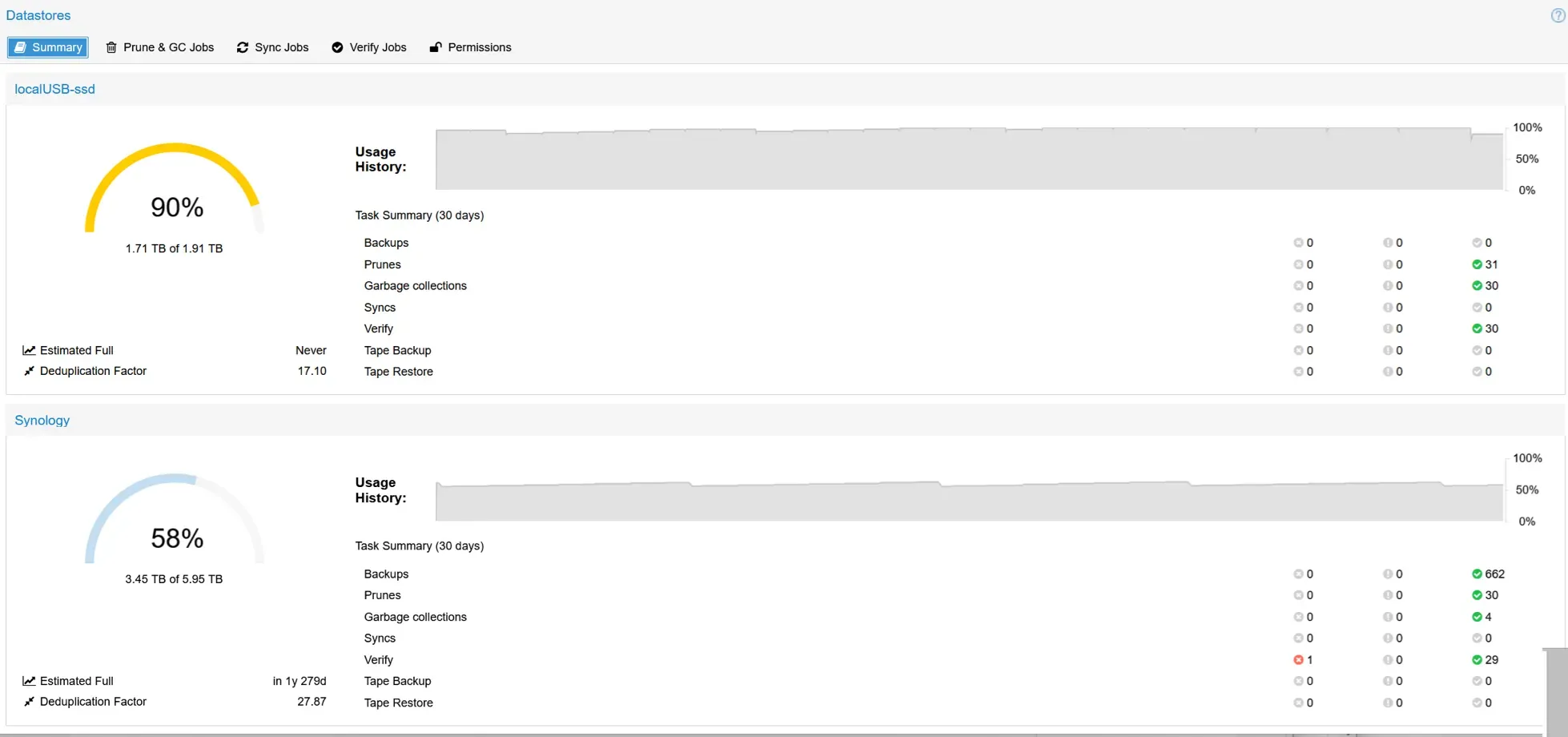
Zstandard compression shrinks the chunks further. My main datastore sits on a Synology NAS and holds 3.45TB of 5.95TB. In the last 30 days, it took 662 backups. PBS shows a deduplication factor of 27.87. Without dedup, the same data would need about 96TB. A USB SSD serves as my second datastore for daily sync copies.
Download the ISO, write it to a USB stick, and boot from it. The installer is a complete operating system. Pick the target disk, choose ext4, XFS, or ZFS, set a network address, and you are done. You can also install Proxmox Backup Server on top of an existing Debian system.
I installed PBS bare metal on my fanless J4125 mini-PC. It has a single SSD, so I chose ext4 for simplicity. The install took about 3 minutes. After that, I mounted my Synology share via NFS and added it as my main datastore.
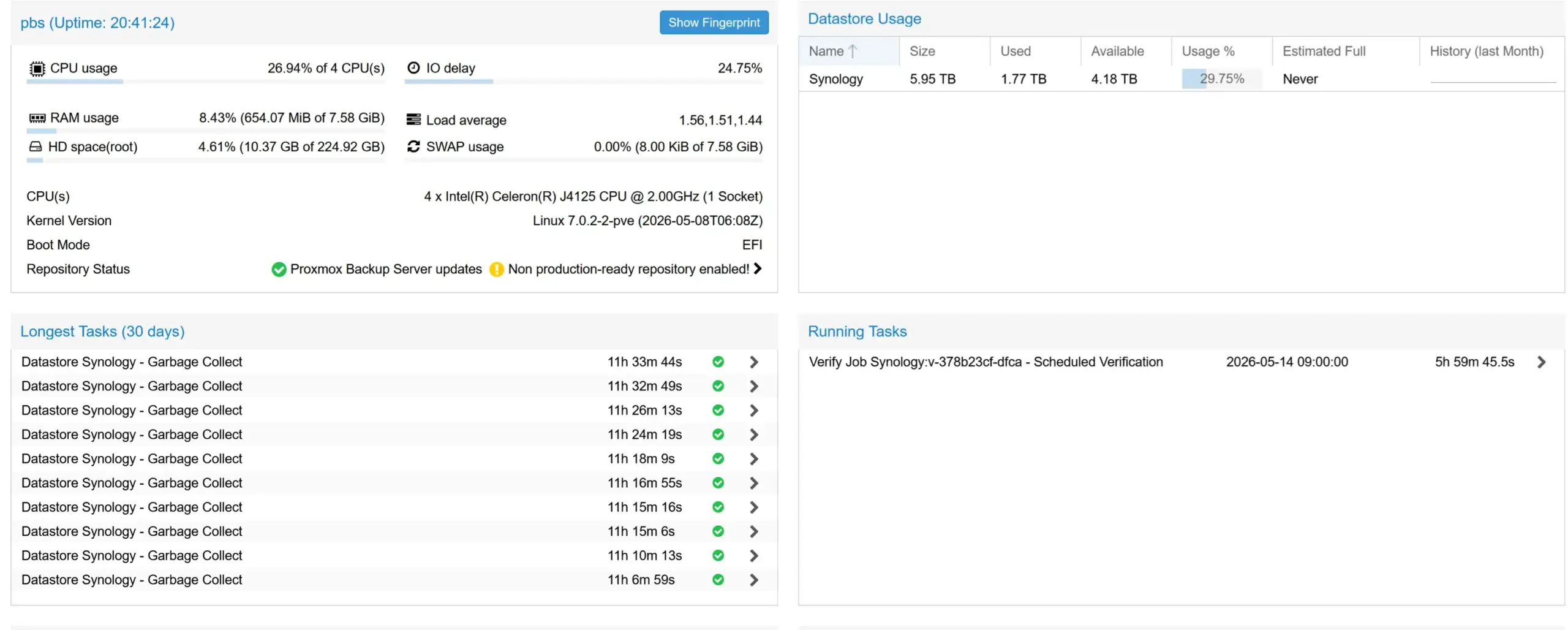
Less than you think. My PBS runs on a fanless Celeron J4125 mini-PC with 8GB RAM and a single SSD. I bought it on AliExpress for about $150. In daily use, RAM sits around 8%. During a full verify over NFS, CPU peaks at about 27%. The CPU was never my bottleneck. The HDDs in my Synology were.
If the boot SSD dies, I reinstall PBS and point it back at the existing datastore. My backups live on the Synology, not on the mini-PC.
For a small business, I recommend mirrored SSDs. Drives fail first, and a mirror keeps the backup server running when one dies. Pair that with 16 to 32GB RAM, and you can back up a Proxmox cluster with 20 to 50 VMs.
For my next PBS box, I plan two HDDs as a ZFS mirror plus two SSDs as a special vdev. The special vdev stores metadata on the SSDs, which speeds up garbage collection on HDDs. But it is not a cache. If the special vdev dies, the whole pool dies with it. Always mirror it. A read cache (L2ARC) is different. If it fails, you only lose speed.
Yes, absolutely. Many homelabbers run PBS as a VM, and it works well. What matters is where the datastore lives. Keep it on a NAS or a disk outside the Proxmox host. If the host dies, you reinstall PBS, which took me about 3 minutes, attach the existing datastore, and restore your VMs. If the datastore sits on the same host it protects, one failure takes out everything.
On a separate bare-metal box, Proxmox Backup Server stays available even when your PVE nodes go down. For setups where downtime means lost revenue, a dedicated installed bare metal PBS is the safe choice.
PBS stores everything in datastores. A datastore is a folder on ext4, XFS, or ZFS, a mounted NFS share, or, since PBS 4.2, an S3 bucket. Inside it, PBS keeps the chunks plus an index per snapshot that lists which chunks belong to it.
I run two datastores. My main one sits on my Synology over NFS. A USB SSD holds a second datastore that gets a daily sync copy. Each datastore stores its own chunks, so the sync copy takes real disk space.
Freeing space takes two steps. Prune removes the snapshot index. Garbage collection then deletes the chunks no snapshot uses anymore. I learned this when my USB SSD datastore hit 100%. Pruning alone freed nothing. Space only came back after GC ran, and GC skips chunks used in the last 24 hours.
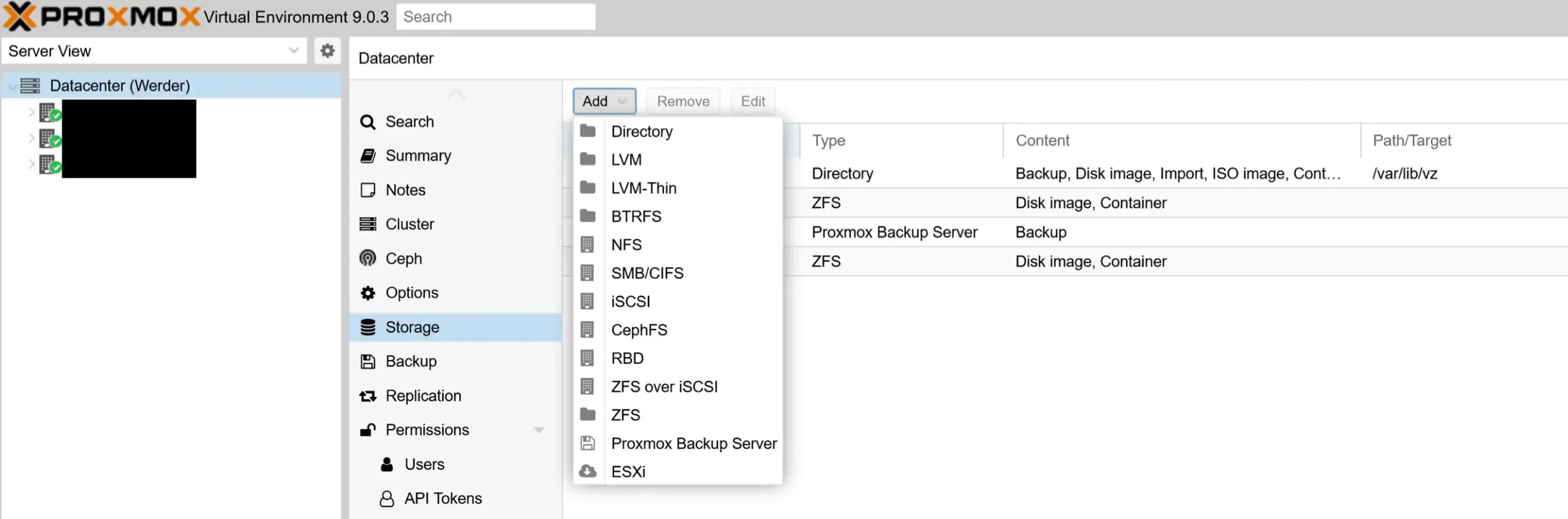
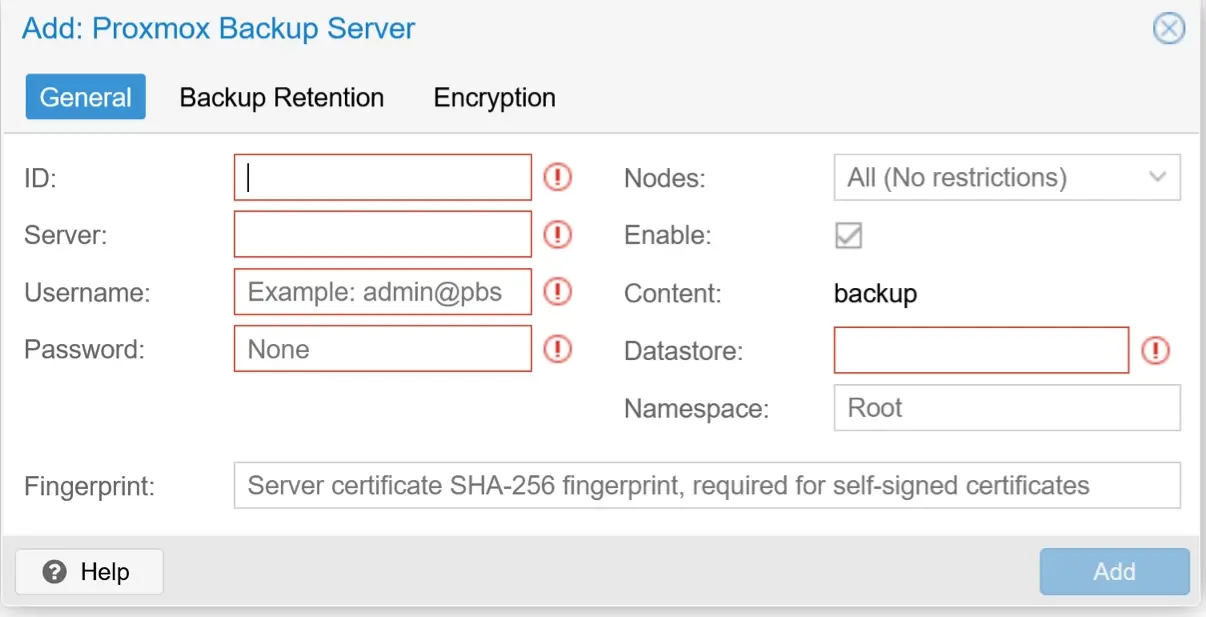
Proxmox Backup Server is tightly integrated with Proxmox VE. Go to Datacenter, Storage, Add, Proxmox Backup Server. Enter the IP address, port 8007, your PBS user and password, your datastore name, and the server fingerprint. Once connected, any user with the right permissions can browse and restore backups through the Proxmox VE web GUI.
Proxmox Backup Server is not limited to Proxmox VE. Install the proxmox-backup-client on any Debian or Ubuntu machine and run it from the command line. It uses the same chunking and deduplication as VM backups, and the backups land in the same datastore.
I don’t back up my physical hosts. If one dies, I reinstall it. The data that matters lives in my VMs and containers, and those are already in PBS.
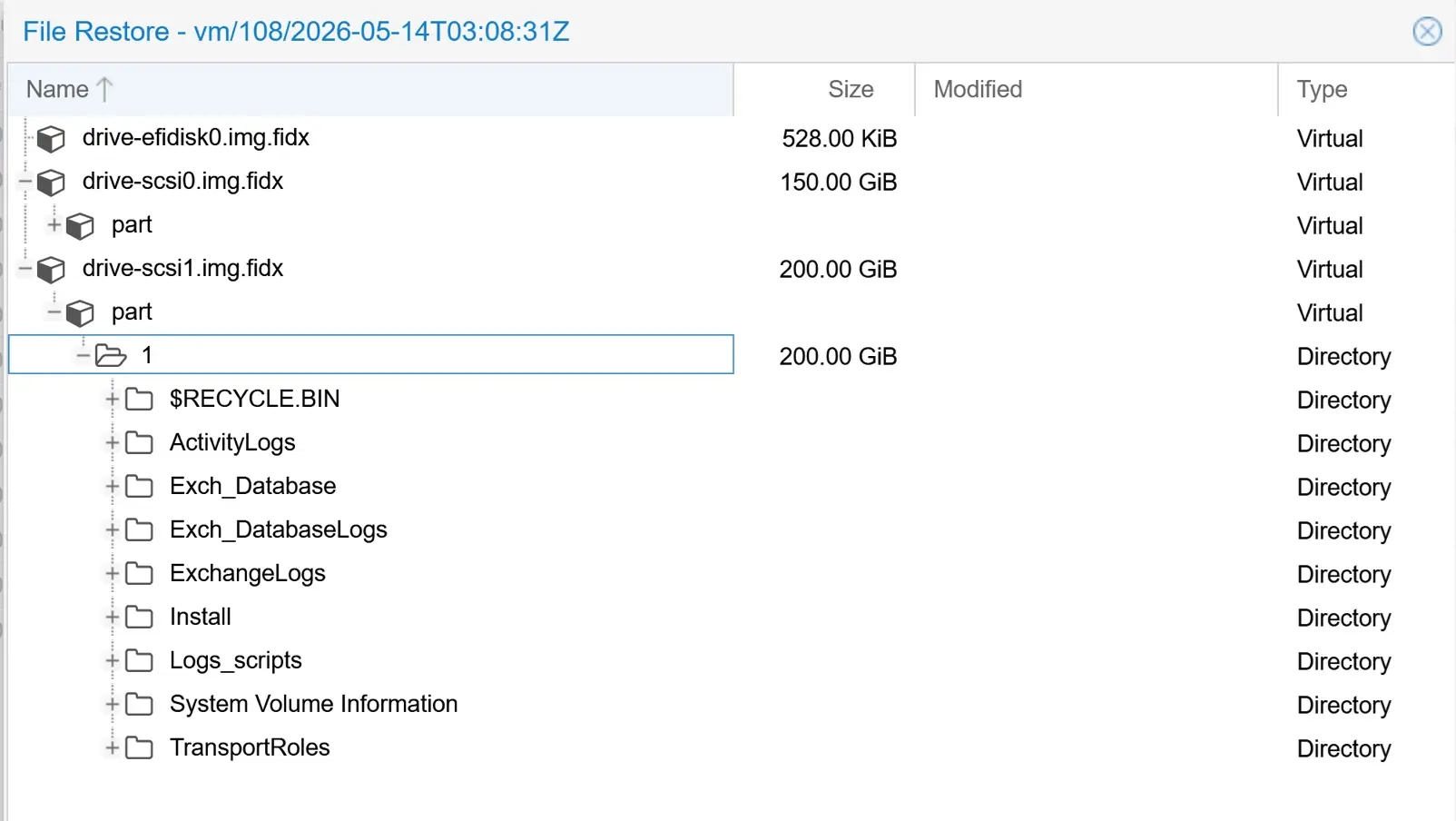
PBS provides block-level, image-level, and file-level recovery. This enables fast disaster recovery compared to full backup tarball methods. The web-based management tools let administrators search and download individual files and directories directly from the backup archive. File-level restore lets you browse and download individual files. To get them back into the VM, you copy them manually. You can’t restore individual files directly back to the VM.
Need to recover a full VM after a node failure? Proxmox Backup Server supports live restore. The VM starts almost instantly while the remaining backup chunks copy in the background. This cuts downtime from hours to minutes.
PBS encrypts on the client with AES-256 in GCM mode. The backup server only ever sees encrypted chunks. That matters if your datastore sits on hardware you don’t fully trust, like a cloud server or a friend’s office.
Since PBS 4.2, push sync jobs can also encrypt snapshots before sending them to a remote datastore. Keys for tape and sync jobs are managed in one place.
I don’t encrypt my backups. Both datastores stay inside my home network, on hardware I control. If you do encrypt, back up your key outside PBS. Without it, your encrypted backups are unreadable.
For local storage, a mirrored ZFS pool gives you checksums, compression, and redundancy. Since PBS 4.2, S3-compatible object storage is officially supported, for example AWS S3, MinIO, Wasabi, or Backblaze B2.
One limitation: PBS does not support S3 Object Lock. If you enable it on the bucket, garbage collection can’t delete old chunks, and the datastore can become inconsistent. I have tested Wasabi as an S3 target, but with Veeam, not PBS. For my immutable offsite copy, I now use Veeam to an Ubuntu server.
Sync jobs copy snapshots from one datastore to another. The target can be a second datastore on the same PBS or a remote PBS over HTTPS. A pull job runs on the target and fetches only new chunks. A push job runs on the source and sends them. Since PBS 4.2, push jobs can encrypt snapshots before they leave.
I use a local pull sync job. Every day at 18:00, my PBS copies new snapshots from the Synology datastore to the USB SSD. The last run took 31 minutes. For my next PBS box, I plan to turn this around. The new box becomes my main PBS, and the old mini-PC pulls from it. That way the main box has no access to delete the copy.

Create an API token with read access on PBS1, add PBS1 as a remote on PBS2, and set up a pull sync job on a nightly schedule. PBS2 fetches only new chunks over HTTPS. PBS1 stores no credentials for PBS2. If PBS1 gets compromised, the attacker can’t reach or delete the copy on PBS2.
My own setup covers 3-2-1 with two tools. The production data runs on my Proxmox host. PBS keeps a copy on the Synology, and a daily sync puts a second copy on a USB SSD, a different medium. Veeam sends an offsite copy to an Ubuntu server with immutable storage. That’s four copies, on at least two media, with one offsite.
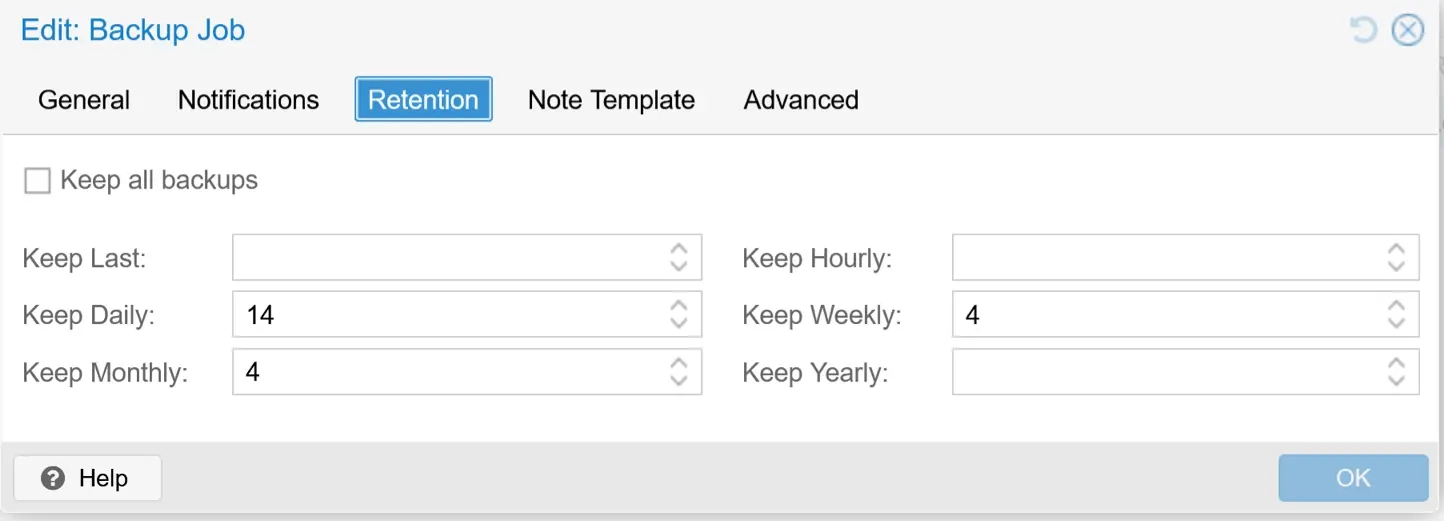
You can set retention in two places: the Proxmox VE backup job and a prune job on the PBS datastore. Both run, and the stricter one wins. My PVE job keeps 14 daily, 4 weekly, and 4 monthly. My PBS prune job on the Synology keeps 7 daily and 4 weekly. The result: 7 daily, 4 weekly, and no monthly backups at all. The screenshots below show both settings. Check both places so they match what you actually want.
Each datastore can have its own retention. On my USB SSD, I keep only 4 daily and 2 weekly. That datastore once hit 100%, and tighter retention plus garbage collection brought it back.
Retention has a direct effect on storage. Both my datastores hold the same backups. The Synology keeps 7 daily and 4 weekly and uses 3.45TB. The USB SSD keeps 4 daily and 2 weekly and uses 1.71TB. Roughly half the snapshots, half the space. Each extra snapshot only adds the chunks that changed, but over weeks those changes add up.
|
Datastore |
Retention |
Used |
|
Synology |
7 daily, 4 weekly |
3.45TB |
|
USB SSD |
4 daily, 2 weekly |
1.71TB |
Enable email notifications for failed backup and verify jobs. Each Proxmox VE node sends a notification when a backup job finishes, so you catch failures early.

Verify jobs read every chunk and check its SHA-256 checksum against the index. That catches silent corruption before you need a restore. In the verify job, enable Skip Verified and set Re-Verify After to 30 days. PBS then skips snapshots it verified recently.
On my Synology over NFS, a full verify took 8h 35m. The same job on a USB SSD took 1h 54m. With Skip Verified on, my daily verify now takes 2 seconds. The HDDs were the bottleneck, not the network.
Prune and garbage collection work as described in how PBS stores data above. Set both schedules once in the web GUI, and they run on their own.
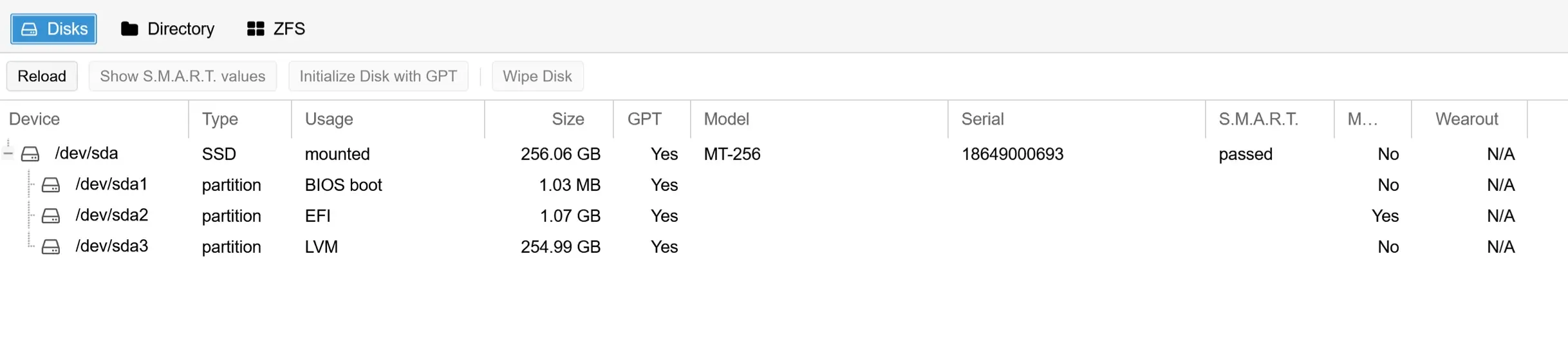
My PBS runs bare metal on an XCY Firewall Appliance mini-PC with an Intel Celeron J4125, 8GB RAM, and a 256GB SSD. I bought it on AliExpress for about $150. It’s fanless and runs 24/7.
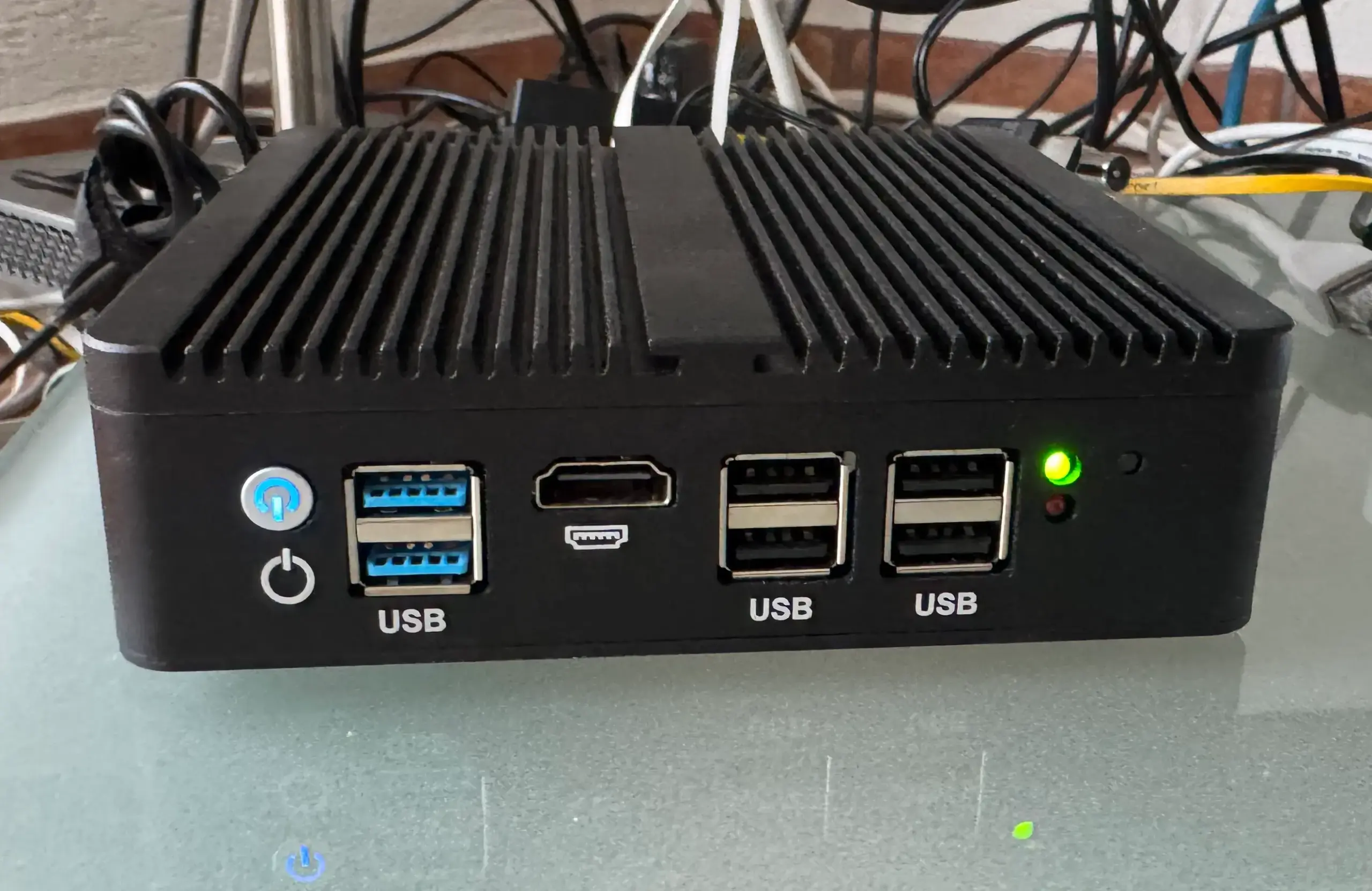
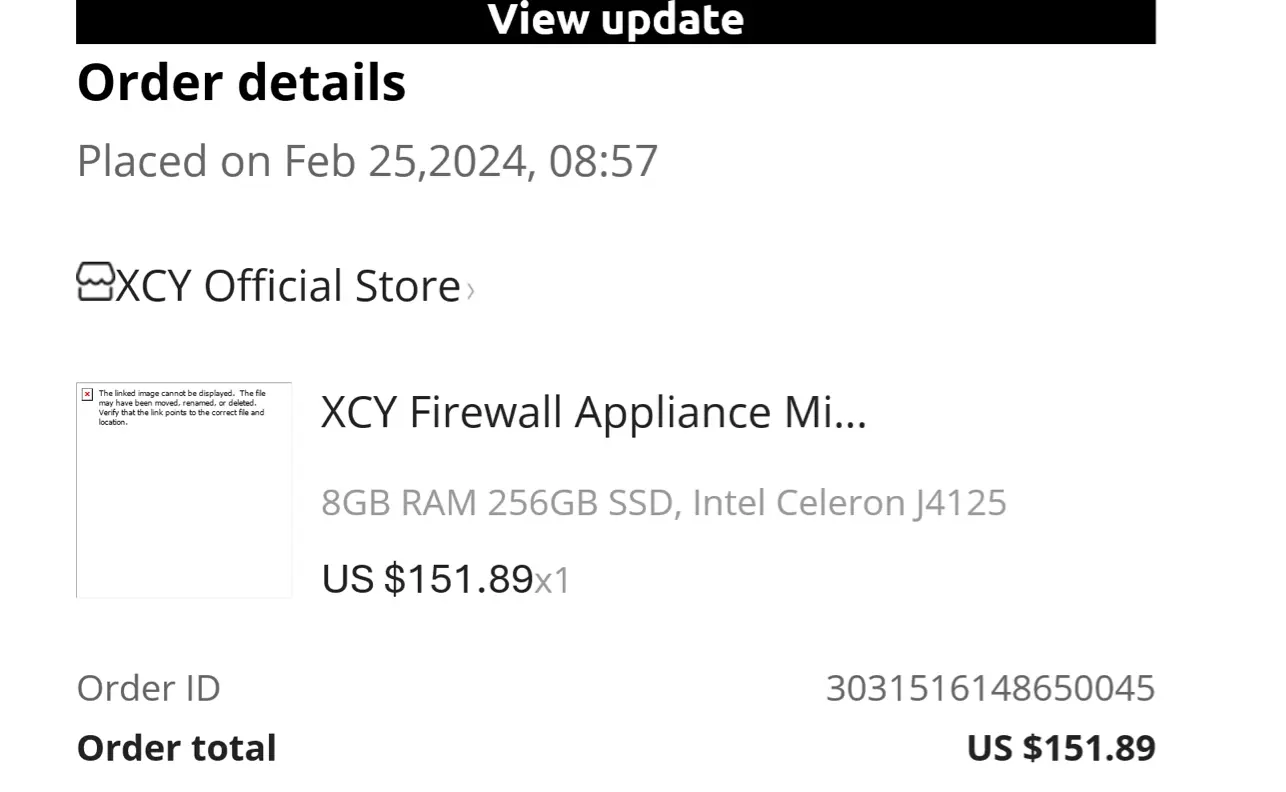

You can find similar mini-PCs on eBay.
My main datastore is a Synology NAS over NFS. When my first verify runs took 8.5 hours, I asked r/Proxmox for help. The answer: the SATA HDDs in the Synology were the bottleneck, not the network. I bought a Lexar SL300 2TB USB SSD for $175 and set it up as a second datastore with a daily pull sync. I documented the full benchmark in my guide on why Proxmox Backup Server verify is slow.
On top of PBS, Veeam Backup & Replication backs up my Proxmox VMs separately. It sends an offsite copy to an Ubuntu server with immutable storage. Even if PBS or the Synology gets compromised, that copy can’t be changed or deleted.
Next, I plan to replace the Synology with a Ugreen NASync DXP4800 Plus running PBS bare metal. I’ll update this article once it runs.
After publishing this article, I asked r/Proxmox about my 8.5-hour verify times. The community confirmed it: SATA HDDs in the Synology are the bottleneck, not the network. I bought a Lexar SL300 2TB USB SSD for $175 and set it up as a second datastore with a daily sync job from the Synology.
Full verify dropped from 8h 35m to 1h 54m.
With Skip Verified enabled, daily verify now takes 2 seconds. A $175 SSD solved what I thought was an NFS problem.
I documented the full benchmark, including read thread tests and HDD vs SSD verify times, in my guide on why Proxmox Backup Server verify is slow.
Veeam added native Proxmox VE support in version 12.2 with agentless VM backup. Version 13 brought the Linux-based Veeam Software Appliance, and since v13.1 you can manage Proxmox jobs in its Web UI. No Windows console needed anymore.
Veeam Community Edition is free for up to 10 workloads, Proxmox VMs included. Above that, you pay per workload. PBS has no limit on VMs.
PBS wins for pure Proxmox setups. It’s lightweight, built in, and free at any size. Veeam makes sense in mixed environments with VMware, Hyper-V, and Proxmox.
I run both. PBS handles my daily Proxmox backups. Veeam handles the offsite copy with immutable storage. They solve different problems.
Keep the datastore off the Proxmox host you back up. Bare metal or VM, that’s the rule that matters. A mini-PC with a single SSD is enough for a homelab. For a small business, use mirrored disks.
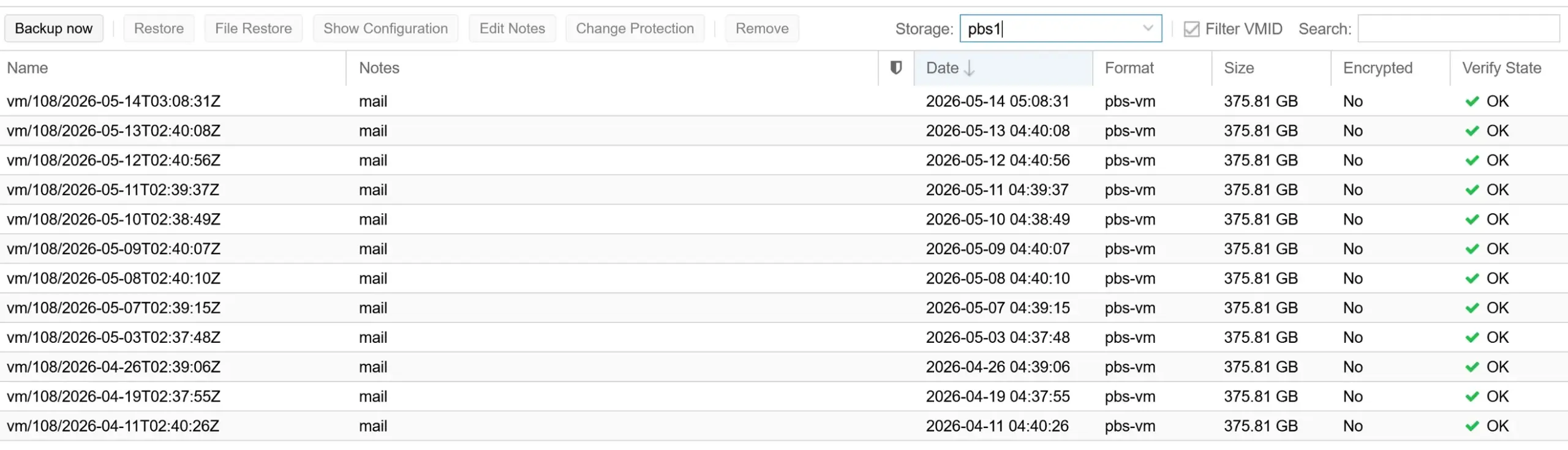
Run verify jobs with Skip Verified, and test a restore now and then. I’ll be honest: I have never run a full test restore. I have browsed and downloaded files with file-level restore, as the screenshot above shows. But that doesn’t prove a full VM comes back. A backup you have never restored is a guess.
Place your backup storage in a different room from your Proxmox nodes. If both sit in the same rack, one fire, flood, or theft takes out production and backups together.
Keep Proxmox VE and PBS up to date. PBS 4 works with Proxmox VE 8, but versions two major releases apart are supported on a best-effort basis only. Here is how to update Proxmox manually.
Other homelab users recommend backing up and verifying on a fast local SSD, then syncing to a NAS for longer retention. My setup runs the other way around today: the Synology is my main datastore, and the SSD gets the synced copy. Moving verify to the SSD made the biggest difference for me.
I’d love to hear from you. Was this article helpful? Share your thoughts in the comments below. If you prefer, you can also reach me by email or connect with me on Reddit at Navigatetech.
Hi, I'm Edy Werder. I write hands-on guides about servers, virtualization, NAS and WordPress, based on setups I run in my own homelab. Real configs and real results, no fluff.
Enjoying the content?